At the Unix prompt:
Type: mcidas -config
Your session should still be set for six frames from the last time you changed the settings in the Configuration GUI. Set it for twenty frames, save the settings as described in Getting Started.
Type: DATALOC
If this is the first time you are using the ADDE, the table is empty and the following listing is displayed.
Group Name Server IP Address -------------------- ---------------------------------------- |
Type: DATALOC ADD RTGOESR ADDE.UCAR.EDU
Type: DSINFO ALL RTGOESR
Type: DSINFO I RTGOESR
Note that instead of the full word, 'IMAGE,' only an I is used. Each parameter in DSINFO can be abbreviated with its first letter instead of writing it out in its entirety.
The first part of the listing is displayed below. The NumPos value is the number of positions in the dataset. When setting up servers with newer data types, NumPos of 99999 usually means that the server can access an unlimited number of files on the remote machine.
          Dataset Names of Type:  IMAGE in Group:  RTGOESR

 Name         NumPos   Content
 ------------ ------   --------------------------------------
 CONUS        99999    GOES-East CONUS all bands
 CONUSC01     99999    GOES-East CONUS 0.47 um VIS aerosol-over-land
 CONUSC02     99999    GOES-East CONUS 0.64 um VIS clouds fog/insol/winds
 CONUSC03     99999    GOES-East CONUS 0.86 um Near IR veg/burn scar/aerosol
 CONUSC04     99999    GOES-East CONUS 1.37 um Near IR cirrus cloud
 CONUSC05     99999    GOES-East CONUS 1.61 um Near IR cloud phase/snow
 CONUSC06     99999    GOES-East CONUS 2.24 um Near IR land/cloud vege/snow
 CONUSC07     99999    GOES-East CONUS 3.89 um IR Sfc/cloud/fog/fire/winds
|
Type: IMGLIST RTGOESR/CONUSC13.-10
The following listing is a sample of what is displayed. The Pos value is the absolute position of the image in the dataset. The image listed first is the most recent image, relative position 0. The next image is the second most recent image, relative position -1...
 Image file directory listing for:RTGOESR/CONUSC13
   Pos Satellite/         Date       Time      Center   Band(s)
       sensor                                 Lat  Lon
   --- -------------  ------------  --------  ---- ---- ------------
   576  GOES-16       16 SEP 19259  02:16:14    30   87 13
   575  GOES-16       16 SEP 19259  02:11:14    30   87 13
   574  GOES-16       16 SEP 19259  02:06:14    30   87 13
|
Type: IMGLIST RTGOESR/FD.-1 BAND=1
The following listing is an example of what is displayed. The Pos value is the absolute position of the image in the dataset. The Res values are the resolution of the images' center pixels.
 Image file directory listing for:RTGOESR/FD
 Pos Satellite/         Date       Time      Center      Res (km)   Image_Size
     sensor                                 Lat  Lon    Lat   Lon
 --- -------------  ------------  --------  ---- ----  ----- ----- ------------
 192  GOES-16       16 SEP 19259  02:10:17     0   75
   Band: 1    0.47 um VIS aerosol-over-land             1.00  1.00 10848 x10848
 191  GOES-16       16 SEP 19259  02:00:17     0   75
   Band: 1    0.47 um VIS aerosol-over-land             1.00  1.00 10848 x10848
IMGLIST: done
|
Type: AKA ADD G16C RTGOESR/CONUS
Type: AKA ADD G16FD RTGOESR/FD
Type: AKA
The following listing is displayed.
Alias Name Group/Descriptor -------------------- ---------------------------------------- G16C RTGOESR/CONUS G16FD RTGOESR/FD |
Type: IMGDISP G16C 1 BAND=13 STATION=KAHN SF=YES;MAP VH 2
Type: DSSERVE ADD MYDATA/IMAGES AREA 1 9999 "ALL AREA FILES
Type: IMGLIST MYDATA/IMAGES.4000 4004
If data exists in this block of areas, move or delete the areas or use the IMGLIST command to find an empty block of 5 areas.
Type: DSSERVE ADD MYDATA/TEST-IMAGES AREA 4000 4004 "Scratch areas for testing
A listing similar to the following is displayed.
Group/Descriptor Type Format & Range RT Comment ------------------------ ----- ------------------ -- -------------------- MYDATA/IMAGES IMAGE AREA 1-9999 ALL AREA FILES MYDATA/TEST-IMAGES IMAGE AREA 4000-4004 Scratch areas for testing |
Type: DATALOC
A listing similar to the following is displayed.
Group Name Server IP Address -------------------- ---------------------------------------- RTGOESR ADDE.UCAR.EDU MYDATA <LOCAL-DATA> <LOCAL-DATA> indicates that data will be accessed from the local data directory. |
Type: AKA ADD TI MYDATA/TEST-IMAGES
Type: AKA
The following listing is displayed.
Alias Name Group/Descriptor -------------------- ---------------------------------------- G16C RTGOESR/CONUS G16FD RTGOESR/FD TI MYDATA/TEST-IMAGES |
Type: IMGLIST TI.ALL
The following output is displayed because the dataset has no images.
Image file directory listing for:TI IMGLIST: No images satisfy the selection criteria |
Type: IMGCOPY G16C TI.5 STATION=KAHN BAND=13
Type: IMGLIST TI.ALL
An example of the listing is displayed.
 Image file directory listing for:TI
  Pos Satellite/         Date       Time      Center   Band(s)
      sensor                                 Lat  Lon
  --- -------------  ------------  --------  ---- ---- ------------
    5  GOES-16       16 SEP 19259  02:10:17    34   83 13
|
OR_ABI-L1b-RadC-M3C02_G16_s20180041657204_e20180041659577_c20180041700012.nc
OR_ABI-L1b-RadC-M3C14_G16_s20180041657204_e20180041659577_c20180041700023.nc
OR_ABI-L2-TPWC-M3_G16_s20180041657204_e20180041659577_c20180041701161.nc
ftp ftp.ssec.wisc.edu
login: anonymous
password: your email
binary
prompt
cd pub/mug/Data/ABI/NetCDF
mget *.nc
exit
Type: DSSERVE ADD ABI/CONUS ABIN TYPE=IMAGE DIRFILE='<local-path>/Data/ABI/NetCDF/*RadC*'
Type: IMGLIST ABI/CONUS
Type: DSSERVE ADD ABI/DATA ABIN TYPE=IMAGE DIRFILE= '<local-path>/Data/ABI/NetCDF/*'
Type: IMGLIST ABI/DATA.ALL FORM=ALL
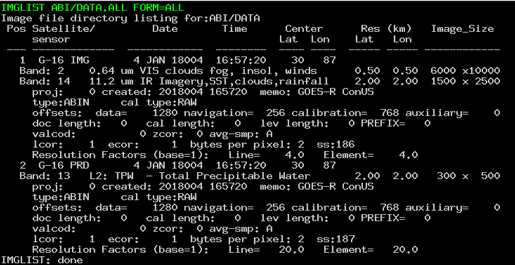
Type: IMGLIST ABI/DATA.1 BAND=2 FORM=BAND
Type: EXIT