9.7. Working with Data from the JPSS AWS Marketplace
Polar2Grid now supports basic image creation using data directly from the JPSS Amazon Web Services (AWS) Marketplace as input. Please note that these examples are supported when using the Bourne-Again Shell (bash).
9.7.1. Creating JPSS AWS VIIRS SDR Images
One of the ways that NOAA distributes satellite data is through the JPSS AWS Marketplace. Polar2Grid is able to access this freely available data allowing users the capability to make images from the archive without downloading data. The basic polar2grid.sh commands are the same; users can just point to the input data from an external location. The following examples demonstrate how to make VIIRS SDR images from JPSS AWS data.
To make an image from one NOAA-21 VIIRS February 8, 2026, granule and a single band, you need to provide the input files from the NOAA AWS s3 Command Line Interface (CLI) using a command like this:
polar2grid.sh -r viirs_sdr -w geotiff -p i01 -f s3://noaa-nesdis-n21-pds/VIIRS-I1-SDR/2026/02/08/SVI01_j02_d20260208_t1956574_e1958221_b16834_c20260208202125135000_oebc_ops.h5 s3://noaa-nesdis-n21-pds/VIIRS-IMG-GEO-TC/2026/02/08/GITCO_j02_d20260208_t1956574_e1958221_b16834_*.h5
This polar2grid.sh command provides an Amazon Simple Storage Service (S3) URI and
single granule filename that I want to use, along with
the accompanying location of the coincident geolocation file.
Note that the JPSS AWS Marketplace online data Browse Bucket URLs
use an https address, but the directory structures and filenames are the same, in this case,
VIIRS-I1-SDR/2026/02/08/SVI01_j02_d20260208_t1956574_e1958221_b16834_c20260208202125135000_oebc_ops.h5.
Executing the command results in the creation of a VIIRS I-Band 01 GeoTIFF file in the default WGS84 projection from February 8, 2026. Notice the use of the wild card in place of the creation date and time of the GITCO file. The remainder of the command execution is the same as when using a local VIIRS SDR dataset.
Using globbing, I can produce images from more than one calibrated SDR file at a time. For instance, to create images of both the I-Band 1 and I-Band 2 JPSS AWS data for this same granule time, I execute the following command:
polar2grid.sh -r viirs_sdr -w geotiff -p i01 i02 -f s3://noaa-nesdis-n21-pds/VIIRS-I{1,2}-SDR/2026/02/08/SVI0{1,2}_j02_d20260208_t1956574_e1958221_b16834_*.h5 s3://noaa-nesdis-n21-pds/VIIRS-IMG-GEO-TC/2026/02/08/GITCO_j02_d20260208_t1956574_e1958221_b16834_*.h5
I can even create true color images by pointing to the required input files. For this granule, I would use the following command:
polar2grid.sh -r viirs_sdr -w geotiff -p true_color -vvv -f s3://noaa-nesdis-n21-pds/VIIRS-I1-SDR/2026/02/08/SVI01_j02_d20260208_t1956574_e1958221_b16834_*.h5 s3://noaa-nesdis-n21-pds/VIIRS-M{3,4,5}-SDR/2026/02/08/SVM0{3,4,5}_j02_d20260208_t1956574_e1958221_b16834_*.h5 s3://noaa-nesdis-n21-pds/VIIRS-{IMG,MOD}-GEO-TC/2026/02/08/G{I,M}TCO_j02_d20260208_t1956574_e1958221_b16834_*.h5
To create true color VIIRS images, M-Bands 3,4 and 5 are required along with I-Band 1 which is used for image sharpening. I also need to use the Terrain Corrected Geolocation files for both I- and M-Band resolution. The image below shows the GeoTIFF created when using this command.

Fig. 9.24 VIIRS NOAA21 True Color single granule image created using a Polar2Grid command that accesses data from the JPSS AWS Marketplace. The observations were collected over the Southwestern United States on February 8, 2026, at 19:56 UTC.
The final example demonstrates how a user can create a GeoTIFF image from multiple consecutive granules using AWS data with one command to produce an aggregated image. Again, we will be using globbing to locate the file start times that we want to be included in the image.
A helpful tool for determining when a satellite is observing a region of interest for a certain date and time are satellite overpass schedules. The University of Wisconsin-Madison Space Science and Engineering Center (SSEC) maintains orbit track archives for many LEO meteorological satellites at this website. The orbit tracks are overlaid on a global map as well as higher resolution maps of the different continents for a given day. In our example, we want to identify the time range of data needed to make a NOAA-21 VIIRS image that includes coverage of the entire Western United States on 8 February 2026. The North American overpass schedule for that day is overlaid on a map as shown below.

Fig. 9.25 NOAA21 satellite overpass locations and times over North America for February 8, 2026, in Universal Time Coordinated (UTC).
The single granule true color image that we initially created was from a granule with a start time of 19:56 UTC and an end time of 19:58 UTC. Now I want to create a true color image that includes all of the Western United States. Looking at the orbit track map, I can see that I will need to choose a data time range between 19:54 to 20:00 UTC for complete coverage for this day. Remember that the orbit tracks represent the sub-satellite point on the earth; the actual swath width of the VIIRS observations is approximately 3000 km. Using this information I can execute the following single Polar2Grid command that includes globbing in the file start time to download 5 granules into memory while the image is being made. The values in the curly brackets are expanded as part of the script execution.
polar2grid.sh -r viirs_sdr -w geotiff -p true_color --num-workers 8 -vvv -f s3://noaa-nesdis-n21-pds/VIIRS-I1-SDR/2026/02/08/SVI01_j02_d20260208_t195{4,5,6,8,9}*.h5 s3://noaa-nesdis-n21-pds/VIIRS-M{3,4,5}-SDR/2026/02/08/SVM0{3,4,5}_j02_d20260208_t195{4,5,6,8,9}*.h5 s3://noaa-nesdis-n21-pds/VIIRS-{IMG,MOD}-GEO-TC/2026/02/08/G{I,M}TCO_j02_d20260208_t195{4,5,6,8,9}*.h5
The outcome is a 5 granule true color GeoTIFF image starting at 19:54 UTC and ending at 20:01 UTC. The image is shown below with added border and grid overlays.
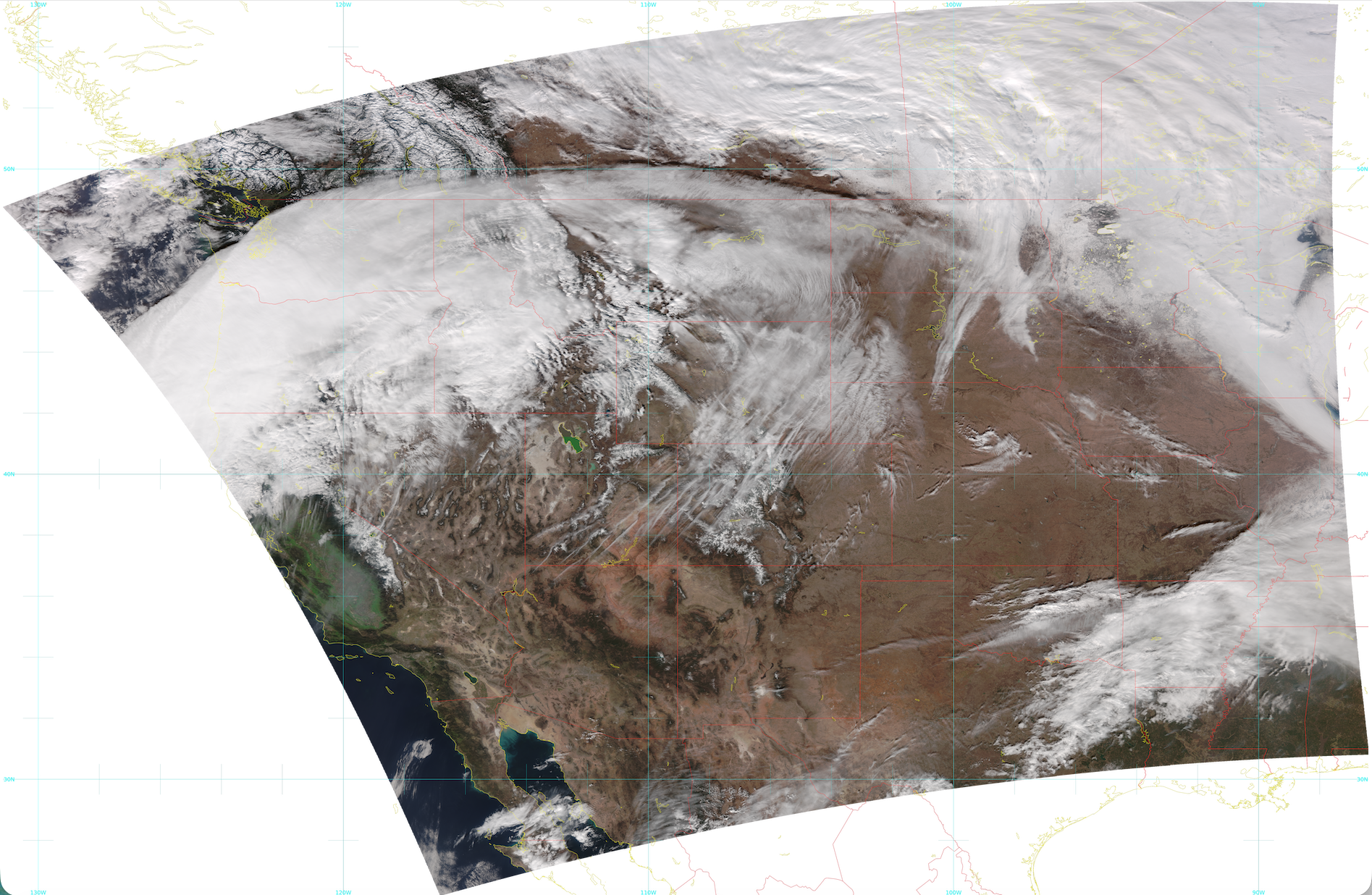
Fig. 9.26 NOAA-21 VIIRS true color 5 granule aggregated image created using AWS data from the JPSS Marketplace. The image spans the time range 19:54 - 20:01 UTC on February 8, 2026.